Model-aware
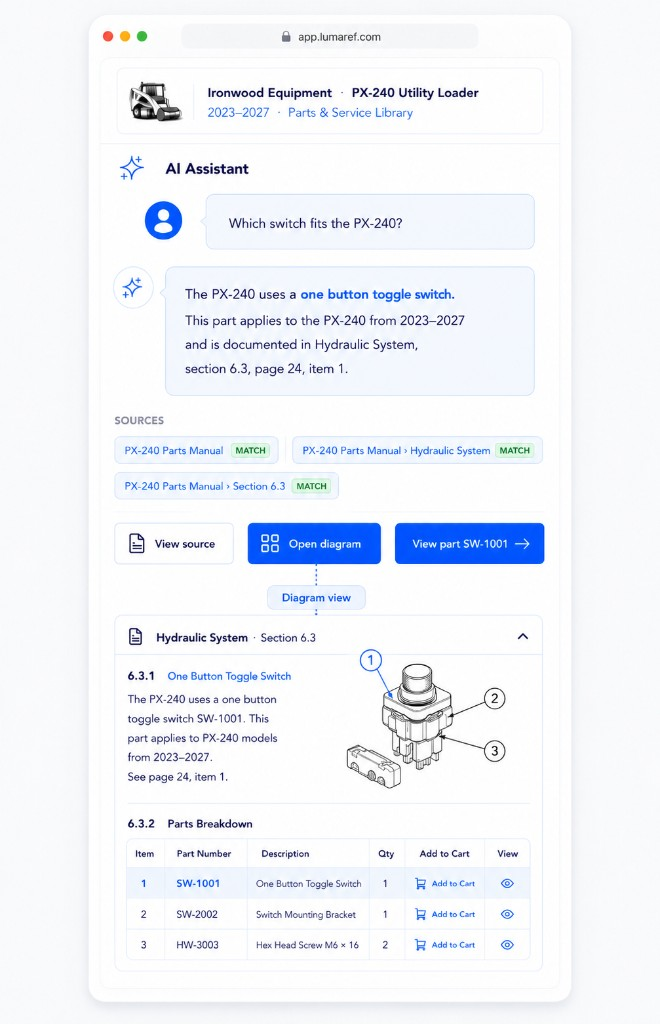
Understand which equipment, model, configuration, serial range, or product generation the information applies to.
Technical Product Knowledge for Equipment Manufacturers
LUMAREF connects equipment, models, manuals, diagrams, parts, and products so customers, dealers, and support teams can find the right answer, verify the source, and take the next step.
Start with one manual, parts catalog, or product family. No documentation replatform required.
Know what applies
Connect every answer to the relevant equipment, model, configuration, and technical context.
Verify the source
Trace answers directly to the manual section, procedure, diagram, or reference behind them.
Continue to action
Move from the answer to the diagram, part, current product, or next step.
Built for the aftermarket
LUMAREF is designed for companies where technical knowledge must remain useful long after the original sale — across customers, dealers, service teams, parts operations, and multiple generations of equipment.
Complex aftermarket knowledge — not generic document search.
The aftermarket knowledge gap
People still have to call someone to find it.
Years of manuals, parts catalogs, diagrams, service bulletins, and product data contain the information your customers and teams need. But using it often requires knowing which document applies, where the answer is hidden, how the diagram connects to the parts table, and which part number maps to the product available today.
Different models, configurations, serial ranges, and product generations make it difficult to determine which manual, procedure, or part is correct for the equipment in front of you.
A paragraph without its technical context, source, and supporting evidence is not enough for consequential work.
Even after finding an answer, the user may still need to inspect a diagram, identify a part, or reach the current orderable product.
The problem is not missing information.
It is the distance between information that exists and knowledge people can use.
From fragmented content to connected product knowledge
LUMAREF recovers the structure and relationships buried inside manuals, diagrams, parts catalogs, service information, and product data.
Existing technical content
LUMAREF
Useful aftermarket experiences
One connected foundation. Many useful experiences.
Why LUMAREF
Finding a matching paragraph is only part of the job. LUMAREF connects the answer to the product context, technical evidence, visual references, and real-world action surrounding it.
Understand which equipment, model, configuration, serial range, or product generation the information applies to.
Turn pages and files into organized sections, diagrams, parts, references, products, and relationships.
Keep answers connected to the exact source and supporting technical evidence.
Move directly from a question to the applicable answer, diagram, part, product, or workflow.
Structure, not just search. Answers connected to action.
From answer to action
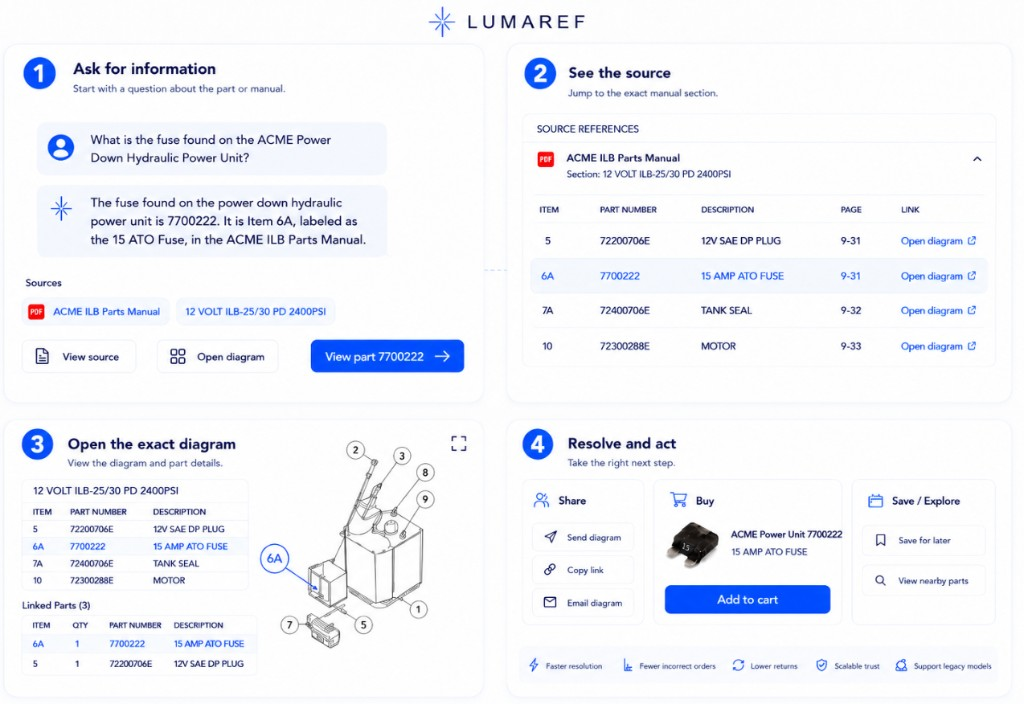
LUMAREF helps people move through the complete technical journey without restarting their search in another file or system.
Identify the relevant equipment, model, configuration, serial range, and authoritative technical source.
Provide a grounded response based on the technical information that applies to the selected equipment.
Open the exact manual section, table, procedure, or reference behind the answer.
View the relevant assembly and callout in its original visual context.
Connect the diagram reference to the applicable part number and description.
Reach the available product, ordering destination, or next step without beginning again.
The AI answer is one moment in the experience. The connection is the product.
Built for aftermarket operations
Give customers and channel partners a reliable way to find answers without searching through directories of PDFs or waiting for headquarters.
Fewer repetitive questions. More independent customers and dealers.
Explore self-serviceHelp teams find applicable, source-backed answers without depending on the one experienced employee who knows where everything is.
Less searching. Faster responses. More consistent answers.
Explore support and serviceConnect diagrams and technical references to the parts and current products people need.
Shorten the path from technical question to the right part.
Explore parts and ecommerceStart with one manual, product family, or self-service experience. Expand the same connected knowledge across support, dealers, ecommerce, and service.
See it in action
Start with a question about the part or manual.
Jump to the exact manual section.
View the diagram and part details.
Take the right next step.
Start with the content you already have. Keep the systems that already work.
Built in the real world
LUMAREF began inside LiftGateMe, where a large replacement-parts catalog and years of OEM manuals, diagrams, and technical information created a familiar challenge.
The answers existed. Finding the right one — and connecting it to the correct model, diagram, part, and current product — was the hard part.
That environment shaped LUMAREF into something different from a generic document chatbot. It was built to understand technical product context, connect information that lives in different places, and turn existing content into experiences people can actually use.
Choose one manual, parts catalog, or product family. We’ll show you how LUMAREF can turn it into model-aware technical self-service connected to sources, diagrams, parts, and products.
No need to rebuild your documentation operation before creating a better experience.